
How does it work?
Jobs
Product-Live Data Factory allows you to create Jobs. A Job is a workflow that allows you to create imports, exports and transformations of data stored in Product-Live or manipulate files and data that are stored outside of Product-Live. These Jobs consist of Tasks that are chained together.
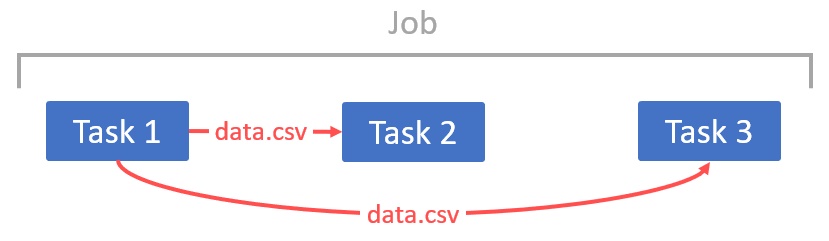
Tasks are elementary actions, for example: FTP Get (allows to get a file on a sFTP/FTP server), CSV to XML (allows to convert a CSV file to a XML file which is easier to manipulate)...
An example of creating a Job for daily importing data from your ERP to Product-Live would be as follows:
- FTP Get Get the latest CSV file on a FTP server.
- CSV to XML Transform the CSV to a XML format.
- Transform XSLT Transform the XML to the format expected by Product-Live
- Import Items Import products to Product-Live
This Job can be executed manually or periodically.
Pipelines
Jobs are executed in Pipelines with the rule First In, First Out: only one job can run on a pipeline at a time, and queued jobs are processed in submission order.
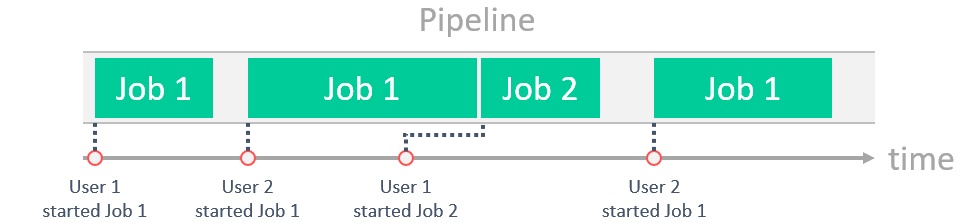
A Job must be associated with one and only one Pipeline. Pipelines are configured by our Professional Services team. Contact your Product-Live representative to set up pipelines on your account.
See the Pipelines reference for detailed scheduling rules, and the Pipelines guide for best practices on organizing your pipelines.
For any question regarding the Data Factory platform, do not hesitate to contact the Product-Live team.