
Rules engine – Create a mapping rule
TIP
In this guide, the source table refers to the table that contains the data you want to map to the target table. Usually this is your own table, but it can also be a table from another system.
The target table refers to the table that will receive the mapped data. Usually this is a table shared from one of your partners.
Once tables are linked, you can create rules that map values from a source table into the target table.
Open the mapping panel
Go to the column to automate and click on Automate data entry:
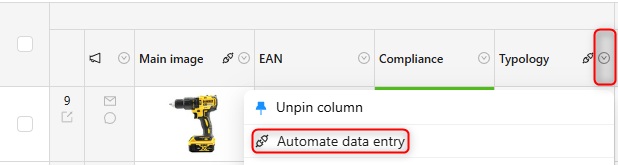
This will open a panel on the right where you will configure the action and the conditions.
Choose an action
The action depends on the data type of the column (text, number, image, select...).
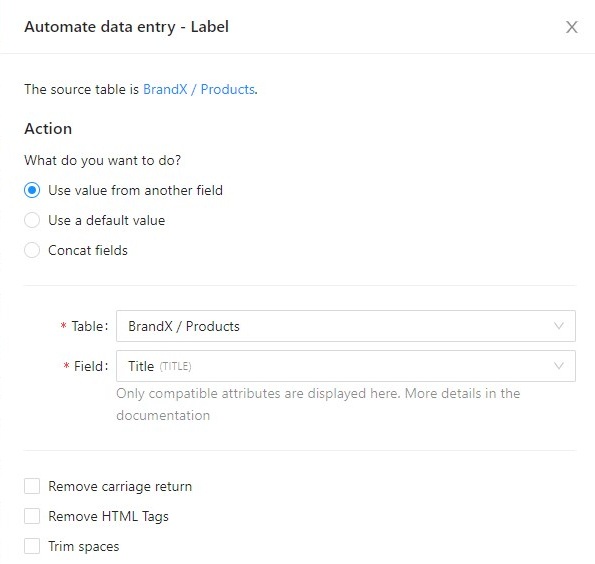
For a text column, for example, you can:
- Use a value from another field (copy a source column into the target)
- Use a default value (always apply the same value)
- Apply a template (advanced formula using Twig to concatenate or transform fields)
- Ignore this column (no automatic update is done on this column)
See: Actions.
Add conditions (optional)
Conditions define when the action is executed.
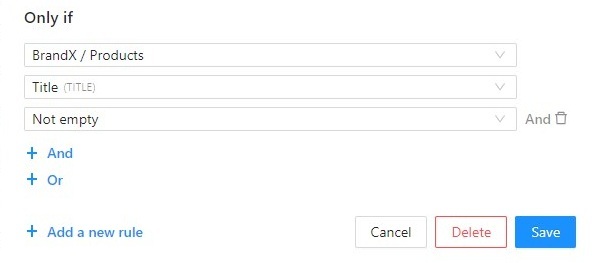
See: Conditions.